

Anthropic just shipped a feature that every enterprise should turn on day one (when it's available). It's called Enterprise-managed auth. It lets you manage your MCP Connectors through your Identity Provider (IdP), with Okta supported at launch. Just as you manage SaaS app access via Okta, you can now control which employees have access to which MCP Connectors. It's a step up from Anthropic's current role-based access control managed through Anthropic's interface.
But, like so many of Anthropic's features, it fixes the problem just enough to make you think you've solved it. And just like misjudging the height of a step, you only realize the issue after gravity kicks in.
What Enterprise-Managed Auth Actually Fixes
Built from the Enterprise-Managed Authorization extension to the MCP framework, it's the first step to broader granular control over MCPs. That extension calls out the following capabilities that worked their way into Enterprise-Managed Auth:
- MCP Registry: A company's IdP functions as the list of approved MCP servers.
- Single Sign-On: No more managing random credentials and uncertainty of how employees connect to MCPs. The company's IdP handles the authentication.
- Policy Enforcement: The IdP checks group membership, role assignments, and conditional access rules before allowing authorization.
- Centralized Revocation: Just like in SaaS apps, you can revoke access from the IdP. Central management FTW.
This is all great news because no business wants to manage Claude with a completely separate workstream. IT teams have (hopefully) spent the last decade putting SaaS applications behind a Single-Sign-On (SSO) solution like Okta. It makes sense that MCPs belong in this workflow because they're just another connection point to the same SaaS apps.
In typical Anthropic fashion, they create demand by forcing you to request early access, which you can (and should) do here. The one downside of early adoption is that the starting lineup of MCP Connectors is a bit light, but that will grow.
This is a strong signal that Anthropic will win in the enterprise. Integrating into existing tools that IT and security teams already use to manage everything else removes adoption friction.
But…and there's always a but. Here comes the miscalculated step height. Every feature has an edge.
The False Sense of Security
The initial release serves as an MCP registry, dictating what MCPs are allowed for each employee or group. It's a great first step. But it answers the question of who can use what Connector. What's lacking is what that person can do with the tool. That's where the true blast radius comes into play. It's not enough to only have an on/off switch. You need granular controls to effectively manage the risk.
Here's an example. Today in Claude, you can get some level of granular controls, but it's an all-or-nothing approach for anyone who has access to the Connector. Take Slack's MCP, for example. It comes with 11 tools, ranging from Claude's ability to read Slack messages and channels to sending Slack messages on the user's behalf.
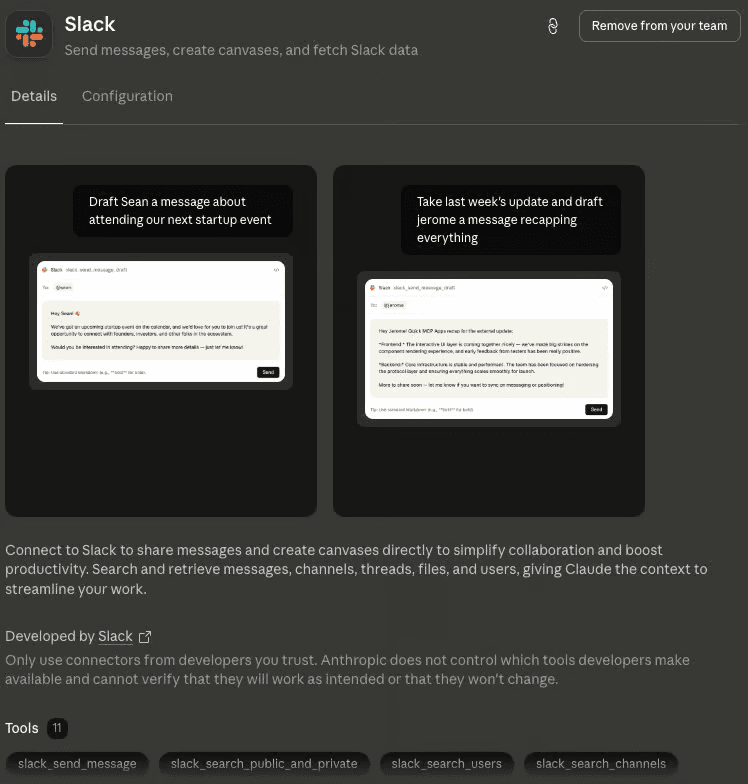
…and 13 permissions you can edit to allow, ask the user for permission, and outright block.
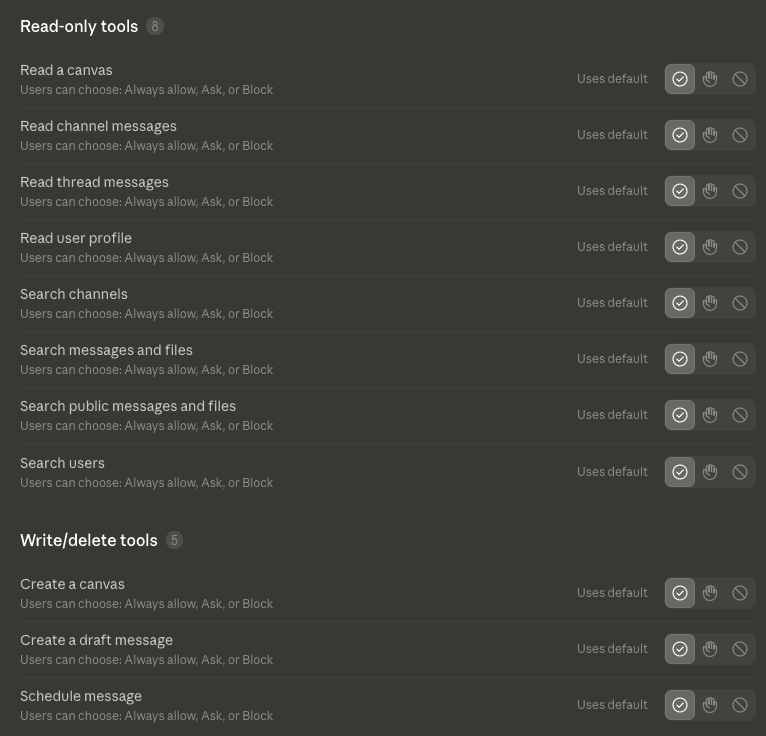
Do you want every user to have the same permissions? Probably, most definitely, not. This is the kind of risk that bites you.
On/Off is the Starting Line.
You can't stop at on/off. We've learned this lesson in security over and over. There was a time when everyone had admin access to everything. Attackers had a field day. So we clawed our way back to least privilege.
So yes: turn this feature on the day it's generally available. It's a massive step forward, it'll make your IT team's life easier, and it gives you that first gate. Just don't get pulled into a false sense of security that you've now locked everything down. This is the new starting line, not the finish.
The Enterprise-Managed Authorization spec leaves room for this granular control, but it's up to Anthropic and IdPs to bake this into the workflow, similar to what they have now for SaaS applications. The real question is how long it will take and whether it will be granular enough to be useful…that is yet to be seen.
In the interim, your best bet is to monitor WHAT people and agents are doing with these MCP connectors and implement your own fine-grained access controls to give you both visibility and control. That's where Evoke can help.