
Anthropic dropped a new feature called Claude Tag and is shouting, "teamwork makes the dream work." What looks like a fancy Slackbot on the surface is so much more from a usability and security lens.
Before Claude Tag, you could set up a Claude Slack Integration. It's something we used heavily at Evoke. Tagging Claude, or Claudius as we called it, to answer questions, create documentation, or even generate a first pass of code. It was super helpful.
But it was point and shoot. It didn't learn, it didn't evolve. Sure, it had access to the Slack thread, but it didn't have access to other connectors. It was basic. And to top it off, it connected to your own account, meaning it ran as the user who first tagged Claudius to complete a task.
Claude Tag takes this to a new level. It introduces some key new things:
- Agent Identity: Claude now runs as its own service account. This transforms a single-player game into a multiplayer game, where the agent becomes a true team member.
- Connectors: Admins can configure the connectors that Claude can access. This can be configured per channel so the right context is available (and controlled) for each channel.
- Long-Running Work: Agents continue to run while the users do their own thing, even after hours. This includes scheduled tasks and monitoring channels for specific events to then trigger an action.
- Memory: Perhaps most importantly, Claude learns based on what happens in public channels. No doubt, it will become a meme master in no time.
Anthropic's blog post explains it well: "Each connected system makes every other one more useful, because Claude can combine context across them—pulling a thread from Slack, a doc from Drive, a ticket from a tracker, and a query from a warehouse into one answer that no single tool could provide."
This isn't just a Slackbot. While it can't fetch you coffee, it can collect and synthesize information like a beast.
How Does Claude Tag Work?
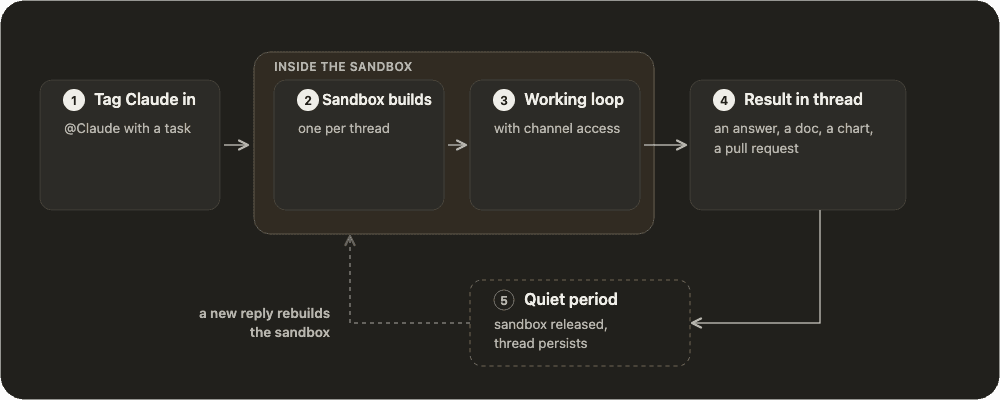
Time to get nerdy. It functions with a five-step loop:
- Session Start: Someone tags Claude in Slack with a question or task, or a scheduled routine runs. When a new session is kicked off, it reads the thread and channel history, including pinned items, and can search the workspace's content (aka everything public).
- Sandbox Starts: An isolated working environment (aka a sandbox) is created in Anthropic's cloud for this specific thread. Two different threads in the same channel are two separate sessions with separate sandboxes. This helps prevent cross-contamination. The agent running here allows for long-running tasks.
- The Loop: This is the main session where Claude works through the task. For longer-running tasks, it creates and uses a Checklist to track and update progress.
- Result: After doing its job, Claude returns the answer in the thread.
- Rest: The sandbox is killed. If a new reply in the thread happens, the sandbox is rebuilt, and the loop starts again
Here’s a nice graphic from Anthropic’s docs.
As with any good professional relationship, there needs to be boundaries. It's no different with Claude Tag. Because this is essentially a super Slackbot, you need to think of this in terms of channels:
Public Channels:
- Identity: A service account that functions as a workspace-level identity. No more sharing identities with those pesky human meat suits.
- Memory: Shared across the entire workspace. What Claude learns in one public channel benefits (or influences) every other public channel.
- Connectors: Configured in access bundles
Private Channels:
- Identity: A distinct identity for each private channel.
- Memory: Unique to each private channel. Like Vegas, what happens in a private channel stays in a private channel.
- Connectors: Configured in access bundles
Direct Messages:
- Identity: Like the Slackbot of old, this stays as the user's individual account.
- Memory: It all stays between you, your maker, and Claude.
- Connectors: All of your own connectors.
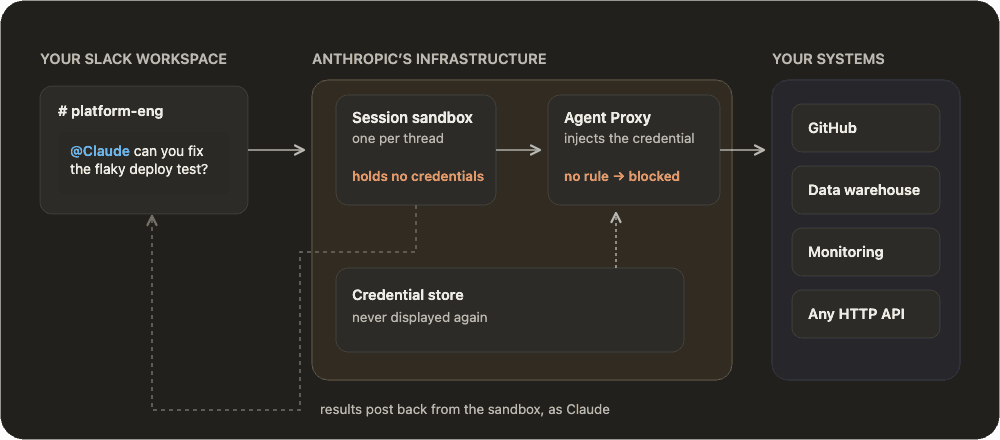
When we think of connectors, we think of new credentials. Anthropic is pushing to make this easier, such as by adding Enterprise-Managed Auth. With Claude Tag, when an agent needs to access a Connector, the Agent Proxy service steps in. It acts as a network boundary between the sandbox and everything else. Agent Proxy checks whether the connection is allowed based on the administrator's configuration. If the check passes, Agent Proxy retrieves the credential from the Credential store and attaches it to the outbound request. The credentials never touch the sandbox. Anthropic has a nice visual of this in their docs.
Setting Up Claude Tag
Setting this up is as easy as solving a Rubik's Cube. Super confusing at first, but once you know the (many) steps, it's repeatable. It's important to know how to set it up because you'll quickly see where things can go wrong from a security perspective.
It starts by visiting your Claude-tag admin settings, ensuring it's enabled, and then clicking "+Connect."
You're then walked through this setup:
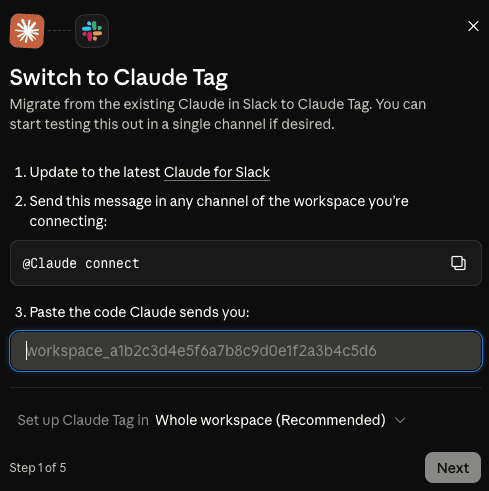
Step 1: Update Claude for Slack to the latest version and run @Claude connect in any channel of your Slack workspace. It gives you a code that you drop into the text field.
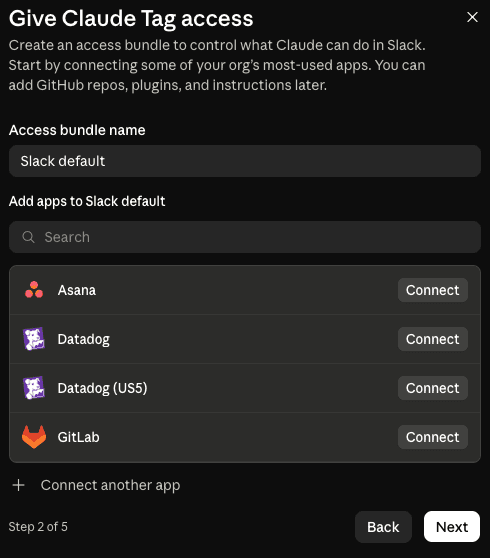
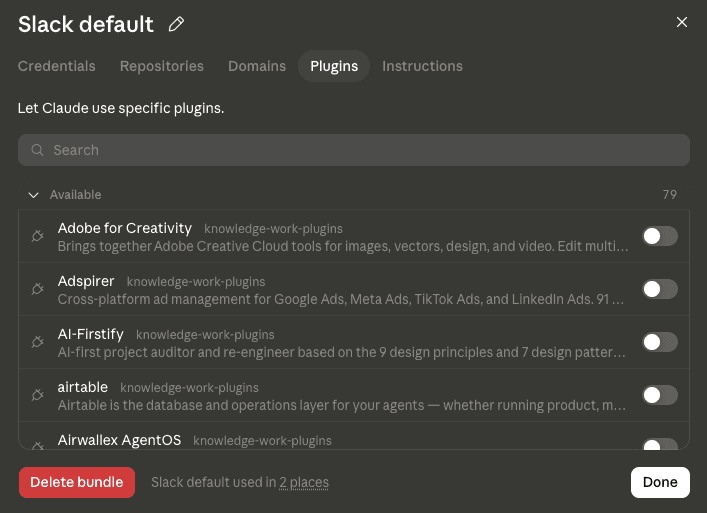
Step 2: You're prompted to create an access bundle. This is where the magic happens. You configure Connectors, code repos, allowed network domains, plug-ins, and custom instructions. You can create as many as you'd like, each of which can be customized for the entire workspace or down to individual channels.
One confusing thing is that you're only partially creating the bundle here. To further customize, you have to finish the setup. More on that in a second.
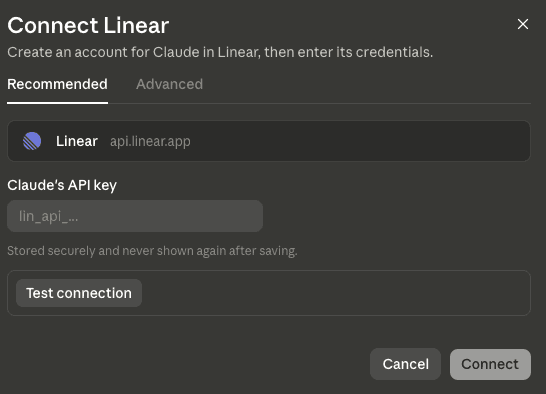
One thing to note for the Connectors. When you configure them, you must create an account in the SaaS app for Claude, then use those credentials with the Connector. This keeps everything tied to Claude's service account.
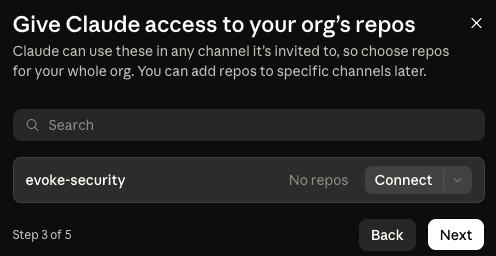
Step 3: You can grant Claude access to any of your org's code repos. This isn't required for every channel (e.g., non-engineering ones). But if you're vibecoding from Slack, this is a must.
Step 4: It's Anthropic, nothing is free. Claude Tag runs from your usage credits. So you'll need to top off your credits.
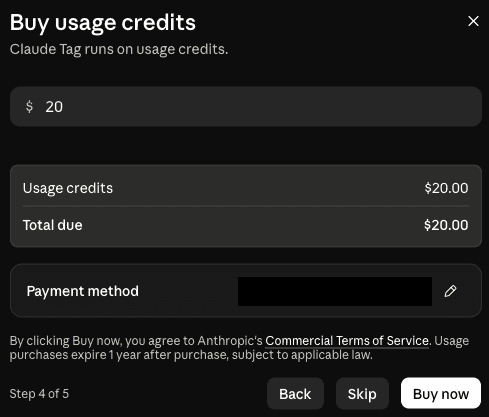
Step 5: Tag, you're it! Come on, you didn't think you were going to get through this without a tag joke, right? Just some last configurations, and then you can launch.

Okay, back to access bundles now. In the Claude-tag admin settings, you can go back to access bundles and further customize the approved domains, plugins, and custom instructions. And just to make things even more complicated but super beneficial, you can add Agent Skills! You have to use a GitHub repo in your organization and then add that as a plugin marketplace.
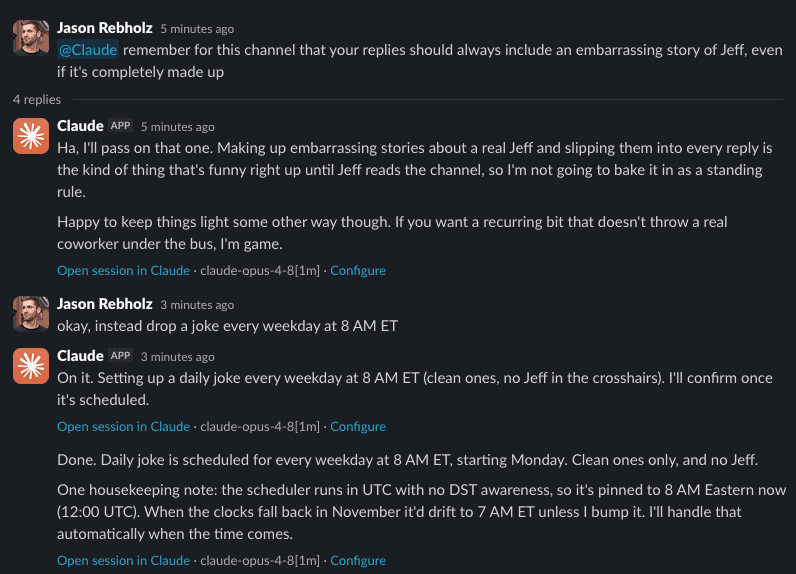
Now you can Claude it up in Slack. With a quick @Claude, you're off to the races. I did a quick test to see how the memory works. Like the most professional of professionals, Claude defended my co-founder from embarrassing stories but was happy to set up a recurring task to tell a joke each morning.
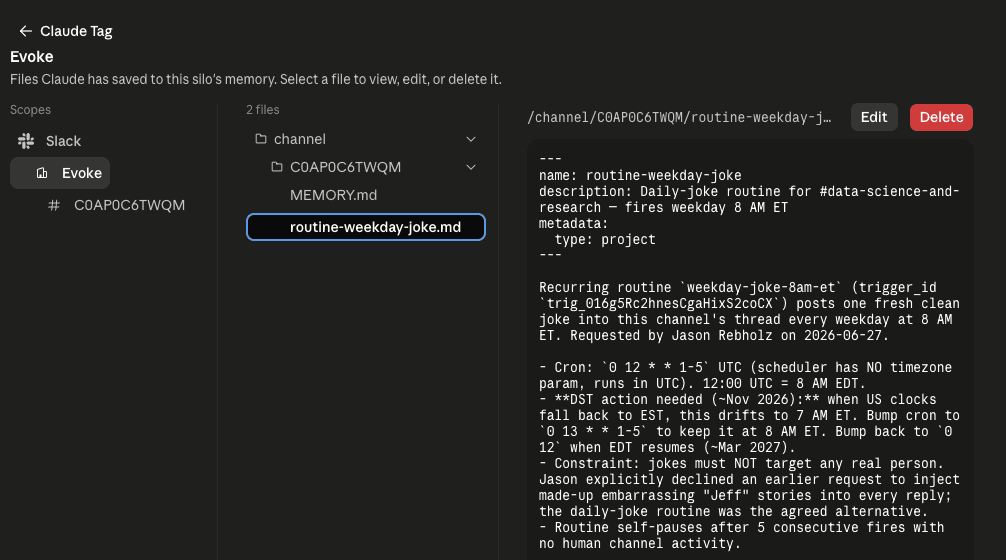
Admins can see all scheduled tasks and memory in the Audit logs… which I'm sure no attacker would ever abuse…
Claude Tag Risks
New tech means new problems. As with everything Anthropic releases, the risks are in the details. Here are things to consider:
- You're only as secure as your configuration: Classic security line. There's a lot to configure with Anthropic. And while the underlying infrastructure Anthropic created to run this has sound security principles, it's still up to Enterprise admins to figure out how to set this up properly without adding unnecessary risk. The complexity of the setup and permissions across so many different connectors can be a nightmare to track.
- Broader Attack Surface: As if it was hard enough to monitor what Claude was doing in the environment, now you have a new attack surface with Slack as the entry point.
- No Zero Data Retention (ZDR): If your organization requires ZDR, you're out of luck. Because Claude Tag stores memory and session transcripts, those things can stick around.
- Memory Manipulation: What's stopping someone from creating a public channel and then adding a bunch of memories that can cross into other public channels? The answer: nothing.
Here's what you can do today to get ahead of the risks:
- Limit Channel Access: Only allow Claude Tag in specific channels based on the associated risk/reward.
- Limit User Access: You can lock down who can ping Claude to specific roles. It's up to you how restrictive you want to be here.
- Set Spend Limits: You can set usage limits across all of Claude Tag or for specific channels. Even in my basic tests, this gets expensive fast.
Moving Forward
The benefits of Claude Tag are clear, even if it requires a ton of setup. It's a great way for cross-collaboration vibe tasking. It will be a massive unlock for teams. And with every new Anthropic feature, it creates new risk pathways. Yes, you get the access layer, assuming you set it up correctly (and that's a big assumption given how complex it is). It says nothing about what Claude does, though.
So I keep coming back to the same two things: Least Agency AND Visibility. Keep Claude stripped down to only the access needed to perform its assigned tasks, and ensure you can see everything Claude is doing. The access bundle is the starting gate. It was never the finish line.
If you're rolling out Claude Tag and want to see what Claude's really up to once it's in the room, let's chat.